


全球IT供应链
国际运输+IT运维外包+自营骨干网
In many small and medium-sized businesses, this scenario is all too familiar: during a critical video conference, the screen freezes, audio cuts in and out, and the meeting has to be restarted two or three times; employees opening the ERP to check inventory wait more than ten seconds for a page to load. When video conferencing lags and ERP runs slow, most people's first reaction is "not enough bandwidth" –and they immediately pay to upgrade. But after the upgrade, the money is spent, yet the slowness persists. In fact, bandwidth may not be the culprit. This article starts with the common root causes of enterprise network lag, and explains how SD-WAN can solve these issues in three targeted steps.
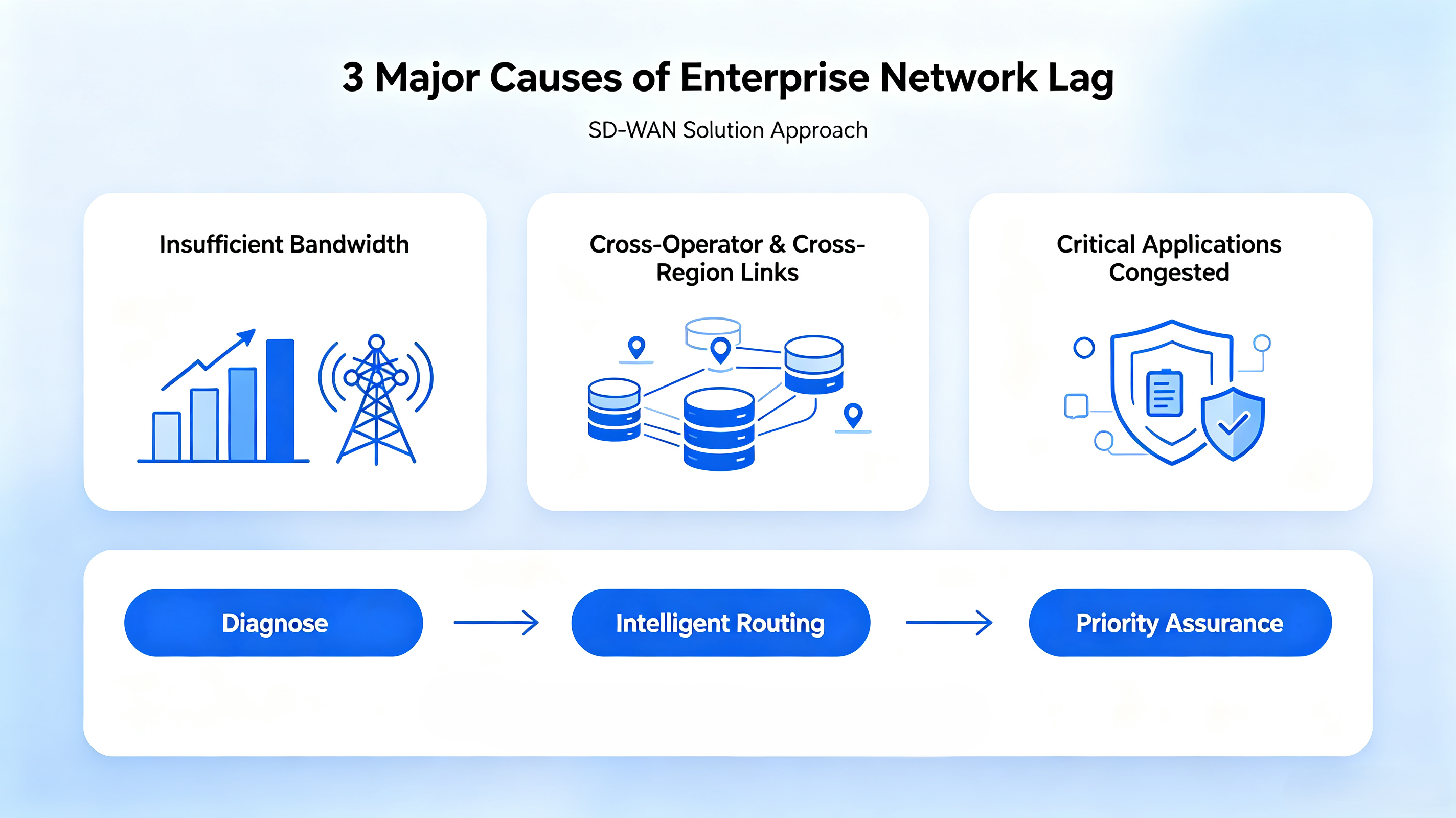
The reasons for enterprise network lag can be broken down into three categories.
● Insufficient bandwidth. When many people are in the office and traffic peaks, bandwidth truly runs out. The characteristic is lag concentrated during fixed time periods, significantly improving after work hours, and all applications access slowly.
● Cross-carrier and cross-geography links. Headquarters uses China Telecom broadband, while branch offices use China Unicom – cross-carrier traffic must detour through relay gateways, causing slow interconnection between Telecom and Unicom; branches in different cities experience slow cross-region access. The characteristic is lag only occurring between specific sites, and bandwidth upgrades bring limited improvement.
● Critical applications are crowded out. Bandwidth is shared equally among all applications; during peak hours, downloads and online video streaming crowd out the channels for conferencing and ERP. The characteristic is lag that comes and goes unpredictably – video conferencing stutters, but normal web browsing works fine.
Among these three causes, only the first can be truly solved by “adding more bandwidth”; for the latter two, even doubling bandwidth will not fundamentally improve the experience. This is the key to fixing video conference stutter and slow ERP access: first diagnose the root cause, then apply the right solution–otherwise, you spend money and the problem remains.
Before making any changes, run three self-checks: Does lag only occur during peak hours? Does it only happen between specific branch offices and headquarters? Are only video conferencing and ERP slow, while other applications are fine? The table below helps you narrow down the direction.
| Lag Symptoms | Possible Root Cause | Targeted Approach |
|---|---|---|
| Lag during peak hours, relieved after work | Insufficient bandwidth | Upgrade bandwidth or offload non-business traffic |
| Specific branch to headquarters is slow | Cross-carrier, cross-geography links | SD-WAN intelligent path selection |
| Only video conferencing and ERP are slow | Application crowding, lack of prioritization | QoS priority guarantee |
If you’re not sure about the diagnosis, you can ask a professional team for a network assessment first – avoid spending money on the wrong fix.
If the root cause lies in cross-carrier and cross-geography links, SD-WAN uses intelligent path selection. It does not require replacing existing lines; instead, it builds a virtual overlay network on top of current broadband, continuously monitors the quality of each link, and automatically routes traffic to the smoothest path. When headquarters and branches use different carriers, traffic no longer has to squeeze through congested relay gateways, and the experience for branches accessing headquarters systems improves.
This step directly targets symptoms like slow Telecom-Unicom interconnection, severe cross-carrier packet loss, and unstable multi-site networking–and it is the most essential difference between SD-WAN networking and simply upgrading bandwidth.
If the cause is application crowding, SD-WAN provides application-level QoS guarantees. It can identify specific applications within traffic and assign higher priority to critical systems like video conferencing and ERP; when bandwidth is tight, non-critical traffic automatically yields. This helps reduce video conference stutter and improve ERP page response during peak hours, alleviating the “lag that comes and goes” situation. For SMEs with obvious peak-hour congestion, this step often yields the most immediate results.
Background: A manufacturing company has its headquarters in an industrial park and two branch offices in different cities. The three sites use broadband from different carriers. Video conferences between headquarters and branches were stuttering, and branches experienced slow access to the headquarters ERP, hampering order and inventory collaboration.
Solution: After assessment, the main causes were confirmed as cross-carrier links and application crowding. The company adopted OgCloud SD-WAN for multi-site networking: each site kept its existing broadband without line replacement; intelligent path selection resolved cross-carrier inter-access, and QoS prioritized video conferencing and ERP.
Results: After going live, video conferences became smooth, ERP access returned to sub-second response, and cross-site collaboration efficiency improved significantly. Compared with the previous dedicated line solution, networking costs dropped by about 50%.
● Diagnose first, then act: Find out the real cause of lag before deciding on a solution – do not blindly upgrade bandwidth or replace equipment.
● Start with a single pilot: For businesses with many branches, begin with the site that suffers the most obvious lag, verify the effect, then roll out to all sites – keeping risks under control.
● Look at service, not just equipment: Multi-site networking is a long-term operation; choosing a service provider that can continuously manage and optimize is more important than simply buying a box.
For SMEs without dedicated network administrators, choosing a managed SD-WAN service is more hassle-free.
Yes. Enterprise-grade SD-WAN comes with three layers of protection: IPSec encrypted tunnels at the transport layer with AES-256 bank-grade encryption–data is encrypted over the public internet and cannot be decrypted even if intercepted. Network isolation keeps branches invisible to each other; unified security policies are pushed from headquarters with one click. OgCloud SD-WAN further adopts ZTNA zero-trust architecture + full national cryptography encryption, and has passed Class‑3 security certification (MLPS), meeting compliance requirements for finance, healthcare, retail, and other industries.
Typically not. SD-WAN is compatible with all existing lines – Telecom, Unicom, Mobile broadband, 5G, and legacy MPLS leased lines can all be reused. Deployment does not interrupt business. Original leased lines can be retained as high-priority or backup links, while broadband and 5G handle elastic traffic–both run in parallel.
Not complicated, and very fast. OgCloud uses ZTP (Zero-Touch Provisioning)–at the branch side, just unbox → power on → plug in network cables; the device registers automatically, requiring no professional IT staff on site. A single branch goes live in 5 minutes; a full multi-branch project for an entire group takes 1–7 days. Supports transparent (bypass) deployment without changing the existing network architecture, so office work is not disrupted during deployment.
Cost depends on the number of sites, bandwidth, and feature requirements. It is recommended to contact a provider for an assessment and a customized quote.
Yes. The lag is often caused by cross-carrier network bottlenecks. OgCloud SD-WAN uses multi-link intelligent path selection + QoS scheduling to automatically avoid congested links, keeping cross-carrier latency stable within 30ms.
Video conference stutter and slow ERP are merely symptoms; behind them are issues like link congestion and application crowding. SD-WAN addresses them in three targeted steps – diagnose, intelligent path selection, and priority guarantee – solving most network lag problems for SMEs at a controllable cost. To find out which category your company's lag falls into, contact OgCloud for a free network assessment and a customized networking solution.